3rd-party cookies are going away, but you’re still being tracked

- Cookies aren't all going away>>Cookies aren’t going away entirely, just some of them
- FLoC>>FLoC
- Device fingerprinting>>Device fingerprinting
- Loyalty programs>>Loyalty programs
- Social media activity>>Social media activity
- Subscriber lists>>Subscriber lists
- How to protect yourself>>How to protect yourself from these tracking methods
In response to consumer demands for more control over their data—and following Safari and Firefox’s lead—Google Chrome will phase out third-party cookies in the second half of 2024.
While this announcement may cause privacy advocates to cheer, it doesn’t necessarily guarantee more privacy. All this change means is that advertisers will simply find other ways of tracking your online habits.
Below, you’ll learn more about the primary tracking methods that will still exist, as well as some tips on how to avoid them.
Cookies aren’t going away entirely, just some of them

Before we get into the replacements for third-party cookies, it’s important to understand what cookies are—and that the “third-party” flavor is only a small part of the wide world of HTML cookies.
Cookies are small bits of text (usually just an ID code) that go between your browser and the web server when you visit a website; e.g., “user_id=1234.” When you visit a website for the first time, the website tells your browser to store a cookie. The next time you visit the site, your browser sends the cookie to the server so that the website knows who you are. First-party cookies of this type are necessary to do things like log you in to your bank account or keep track of what items you’ve put in your shopping cart—all perfectly harmless activities.
Third-party cookies, on the other hand, are created by a website other than the one you are visiting, and they are traditionally installed automatically and without notification as soon as you visit a website. The main reasons sites use third-party cookies are for online advertising and marketing automation. When an ad follows you across the web on multiple websites, third-party cookies are usually responsible.
Has your personal information been exposed online?
As you might imagine, this tracking across multiple sites creates significant privacy risks, and that has led to the pressure to restrict or eliminate this type of cookie. Regulation of third-party cookies is the reason for the cookie notification banners you see across websites nowadays. But, just because these third-party cookies are going away doesn’t mean advertisers will stop trying to track you. The methods are changing—sometimes in ways that better protect your privacy, but not always.
FLoC
***Update: Google has decided to abandon FLoC technology and switch to Topics, another tracking technology that relies on grouping users anonymously based on their browsing habits. We will update this post as this story develops.***
In addition to first-party cookies, your online activities might still be tracked by Federated Learning of Cohorts (FLoC)—the first in a series of proposed technologies that Google is developing to replace third-party cookies.
Basically, the technology involves grouping consumers into large “cohorts” of people with similar interests and other qualities. This lets advertisers target ads to you while making it harder for companies to identify you as an individual.
FLoC doesn’t reveal your browsing history to advertisers. Instead, it relies on Chrome to examine your history on a weekly basis and place you in appropriate cohorts.
Google gives each cohort a FLoC ID that reflects who you are. Then, FLoC shows this label to every website you visit.
To see if Google is using your browser data in its FLoC trial, go to Am I FLoCed?. You can opt out of FLoC by disabling third-party cookies in Chrome: Just click Settings > Privacy and Security > Cookies and other site data > Block third-party cookies.
Device fingerprinting

One of the reasons Google gives for delaying its third-party cookies ban until it develops a replacement technology is that doing so will prevent advertisers from turning to device fingerprinting, also called browser fingerprinting or machine fingerprinting.
Device fingerprinting refers to websites identifying you via data signals your browser reveals when you visit a website.
Ready to protect your identity & secure your private information?
These signals can include:
- Your IP address
- Your operating system
- The size of your browser window
- Your screen resolution
- Your system fonts
- Whether your browser supports Bluetooth
The big problem with device fingerprinting is that once a website identifies your device, it’s nearly impossible to re-anonymize yourself. Unlike cookies, which you can delete, you can’t hide your device’s unique signals.
Loyalty programs
Businesses aren’t offering you discounts just to be nice. When you sign up for a frequent flyer miles program, wholesale club card, or preferred shopper card, you are agreeing to let that company track you.
Some of the things companies can learn are:
- What brands you prefer
- When and where you shop
- How much you spend
This data, combined with the information you provide (like your name, age, phone number, email address, and often partial credit card numbers) when you sign up for a loyalty program enables companies to build a comprehensive profile of you, which they often share with partners, advertisers, and others.
All these data points make it easy for malicious actors to steal your identity, scam you, or otherwise target you. To protect yourself, you need to reduce the personal information others can find about you online.
Here are some tips to follow when signing up for a loyalty program:
Has your personal information been exposed online?
- Be careful what you share—Only fill out mandatory fields when signing up for a new loyalty program.
- Read privacy policies—Before you agree to share any personal information with a company, be sure to read its privacy policy to find out how long it keeps your data, what it uses your data for, and whether it shares your data with anyone else. If it stores your data indefinitely or sells it to advertisers, think twice about signing up.
- Don’t use your real email address—Protect your real email address by creating a special account just for these types of programs.
Social media activity
One of the best sources of information about you is your own social media accounts. Every time you click on a link, comment on a photo, or “like” a post, you are giving social platforms another piece of the puzzle that defines who you really are.
Depending on how much you post (or what other people post about you) someone looking for information about you might be able to learn:
- Your hobbies and interests
- The names of your family and friends
- Where you live
- Where you work
- Your daily routine
- How old you are
- Where you went to school
- Your political beliefs
Data brokers and people search sites scan social media profiles for these details and use them to build detailed profiles of you. They then sell these profiles to advertisers and others looking for consumer data.
Your social activity also provides valuable ammunition that cybercriminals use to construct social engineering scams that encourage you to reveal your passwords or other valuable information. One common data “trap” is a fun quiz or game that tricks unsuspecting individuals into revealing personal information—like the brand of their first car or the name of their pet. These answers are often the answers to password reset security questions.

While it’s easy to share too much personal information on social media, this doesn’t mean you need to give up social media entirely to protect your data. There are several things you can do to secure your privacy on these platforms, including:
- Adjusting your privacy settings—Lock down your privacy settings so that only your closest friends can see your posts.
Ready to protect your identity & secure your private information?
- Auditing your accounts—Ensure your profile pages only reveal the bare minimum of information needed to keep your accounts active. Then, look through your posts to verify that they don’t expose any identifying information (like your address, your birth date, or your mother’s maiden name) that someone could use against you.
- Watching what you post—Even with tightened security, there’s always the chance that something you intended to share with only a small group of people will get forwarded to a stranger. As such, it’s important to take a minute before you post anything to ask, “Does this post contain anything I wouldn’t want a criminal to know about me?”
Subscriber lists
Any website that you log in to is considered a subscription. When you register or create an account with one of these sites, you give away a slew of personal details, including your contact, demographic, or payment information.
These sites then share this data with other entities, including:
- Service providers—For example, companies that process transactions.
- Advertisers—For example, marketing firms and their partners.
- Business partners—For example, a supplier or reseller.
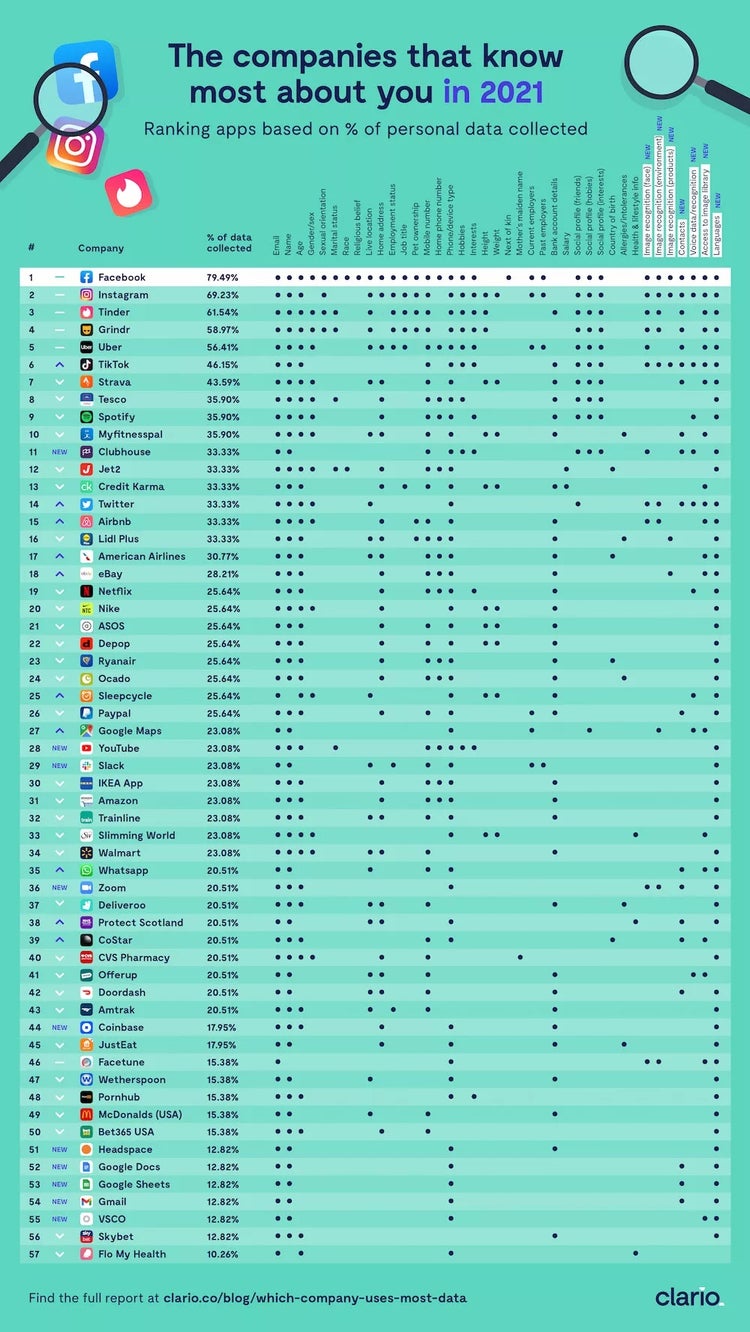
Additionally, these businesses often combine your account registration information with data about you they scrape from other websites, as well as via the mobile apps you download to use their product or service.
Here is a list of companies that gather the most information about you via a mobile app.
Has your personal information been exposed online?
Obviously, protecting your private data from being collected and shared is easier if you delete these apps or don’t download them in the first place. However, doing so might reduce the usability of a particular product or service. For example, you need to have the GoogleMaps app on your phone to access real-time traffic conditions while on the road.
If you really want to keep an app, you can safeguard your privacy by reviewing through the various permissions you have given it and revoke any that allow the app to access your personal data.
How to protect yourself from these tracking methods
While following the various tips listed in the previous sections can make it harder for businesses and individuals to collect your personal data, these steps only address specific areas of data exposure.
To truly protect your data and secure your online privacy you need to devise a comprehensive strategy that enables you to:
- Define your data vulnerabilities.
- Methodically delete information.
- Track your progress in removing your information.
- Monitor the web for new instances of your information.
Creating and implementing this kind of plan often involves a significant investment of time and effort. As such, it makes sense to look for ways to automate the process.
The best solution is to hire an online privacy company, like ReputationDefender, which has years of experience helping individuals and businesses secure their personal information with our ExecutivePrivacy product.
If you need any help finding or removing your personal information from the internet, don’t hesitate to give us a call. We are happy to offer free advice tailored to your particular situation.
To learn more about protecting your online privacy, see these articles:
- The complete guide to removing personal information from the internet
- How to remove your public records from the internet in five steps
- How to remove your phone number from the internet
- Top 5 social media privacy mistakes
Need assistance? Talk to an expert.
All ReputationDefender consultations are free, confidential, and without obligation.
Call 877-492-5209 or Schedule a Consultation