11 ways to boost your online reputation with Google Business Profile

- 1. Claim your listing>>Claim your listing
- 2. Ensure your info is correct>>Verify that your information is accurate and up to date
- 3. Use photos>>Use photos
- 4. Ask for reviews>>Ask people to review you
- 5. Respond to reviews>>Respond to all reviews
- 6. Add videos>>Add videos
- 7. Use Insights>>Track how customers are using your listing with GMB Insights
- 8. Remove duplicate listings>>Clean up duplicate listings
- 9. Use GMB messaging>>Connect with customers via GBP Messages
- 10. Control your Q&A>>Take control of your Questions & Answers
- 11. Update often>>Update your business listing often
This post has been modified to reflect new information since its original publication.
Your Google Business Profile (formerly Google My Business) account is among the first things people see when they look for your business online. This means it can be a powerful tool in shaping your brand’s online reputation, but only if you use it the right way.
Here are 11 things you can do in your Google Business Profile (GBP) account to improve your reputation and gain consumers’ trust.
1. Claim your listing
This should go without saying, but not all businesses understand the reputational advantages that managing your GBP listing gives you. In fact, roughly half of local retailers haven’t claimed their free listings.
To learn how to claim your listing, see this Business Profile support page. Make sure to fill out all fields completely. According to Google, a complete GBP is nearly 40% more likely to attract potential customers. It also doubles your chances of being considered reputable.
Once you’ve claimed your listing, you will be able to promote your business, track business analytics, and gather customer reviews—all of which you can leverage to sway people’s perception of your brand.
Claiming your listing also prevents other people from falsely representing your business online.
2. Verify that your information is accurate and up to date
Have you ever looked up a store’s hours online to check that it’s open, only to find out it’s actually closed after you’ve driven all the way there? How would you feel about a company that did this to you? Would you ever trust it again or recommend it to others? Probably not.
Are online reputation issues hurting your business? Find out with our free Reputation Report Card.
To avoid customer relationship disasters like the one above, you need to check and double-check that your vital information on GBP is correct, current, and consistent with the information on your website, your social media profiles, and your other business listings.
The most important information to get right is your Name, Address, and Phone number (NAP), and you should spell it out exactly the same way everywhere. For example, if you use “State St.” in another business directory, you shouldn’t use “State Street” in GBP.
Other vital information includes updates about any expanded services, special COVID-19 procedures, whether you are temporarily closed, or when you expect to fully reopen (if you were closed previously). You also need to ensure that what you enter for your business Category, Description, and Attributes aligns with your other online properties. Discrepancies in this information across sites will make you look untrustworthy and unprofessional.
Another reason to make sure your information is correct is that anyone can “suggest an edit” to your profile if they think what you’ve posted is incomplete or inaccurate. Your competitors can also edit your listing. To ensure your account displays the correct data, you need to do two things: get your information right the first time and regularly check your GBP account to ensure every detail remains correct.
3. Use photos

Photos are a great way to build trust with potential customers because it shows them what your business is really like. Listings with photos also get more attention. In fact, according to a BrightLocal study, the more photographs a GBP listing contains, the more clicks, direction requests, and phone calls a business will receive. You can leverage this extra attention to spread the word to more people about how great your business is.
To ensure that your images look their best, verify that any photos you upload conform to these guidelines:
- Type—PNG or JPG.
- Size—Between 10 KB and 5 MB.
- Recommended resolution—720 x 720 pixels.
- Minimum resolution—250 x 250 pixels.
- Quality—High quality. For example, all photos should be in focus and feature good lighting. Avoid any overly photoshopped, filtered, or stylized photographs, as looking too “slick” can make you appear less trustworthy. People want to know what your business actually looks like, not how good your editing app is.
It’s also important to note that you don’t have complete control of the images on your business profile, as users can add their own images. Therefore, it’s important to monitor your images to ensure they reflect the image you want to portray. If you find any inappropriate or offensive images that violate Google’s guidelines, you should flag them for removal.
Simply having a lot of photos can also serve as a buttress, protecting your reputation against any unflattering or misleading customer pictures. As such, you should upload photos often, especially these three types:
- Your company logo—This will help consumers recognize your business.
- A cover photo—Google, not you, chooses the main image that appears for your GBP listing. Selecting a cover photo tells Google you want it to display this image as the main picture on your profile, but there is no guarantee that this picture will appear as your listing’s first photo.
- Other photos—Uploading additional photographs lets you highlight your business’s many features.
4. Ask people to review you
More than 63% of people say they’re likely to check Google reviews before visiting a business, thus making Google the top review site. This makes your GBP reviews a great vehicle for earning consumer trust.
Are online reputation issues hurting your business? Find out with our free Reputation Report Card.
It’s a simple formula: The more reviews you have, the more trustworthy you look—and the more likely people will be to buy from you. This is because most Google reviews are positive. You can see the direct correlation between a business’s number of reviews and its revenue in this research from Womply.
While you might be tempted to pay for fake reviews, there are many reasons you shouldn’t do so. The most obvious being that someone will notice the fake reviews and call you out for them. Also, it’s illegal.
Instead, you should encourage more consumers to write authentic reviews. An easy way to do this is to create a special link that takes people right to the review page on your GBP profile. This Google support page shows you how.
You can then include this link on your website, in your email correspondence, and in your social media posts. You can also just ask customers for reviews when you’re talking to them on the phone.
5. Respond to all reviews

Nearly 100% of consumers who read reviews read businesses’ responses to reviews, mostly to see how they treat their customers. Moreover, 80% of people believe that a business cares more about them when it responds to their reviews. This is why you should respond to all your reviews—the good and the bad; doing so shows customers (and potential customers) that you care about their experience with you. It also never hurts to reply to star-only reviews. A simple “Thanks for reviewing us! We look forward to seeing you again” is a great way to show how responsive you are.
Additionally, replying to reviews has been shown to improve your local SEO.
Some good guidelines for responding include:
See your business's reputation the way your customers do. Get your free Reputation Report Card.
- Thanking the reviewer for taking the time to review you.
- Being polite.
- Apologizing if the reviewer had a negative experience, then take the conversation private.
- Offering them information about your company they might find useful, but don’t act like a salesperson.
If you think a review violates Google’s review policy, then you should flag it for removal after responding. For more information about managing your online reviews, see Online review management: The complete guide.
6. Add videos
Not many businesses are adding videos to their profiles yet, so this is a great way to stand out from your competitors.
You don’t need to be an expert videographer to film a video for your GBP profile. Any video, even if it’s just a short introduction describing who you are or what you do, can be an effective method of making a human connection, which leads to increased trust.
Before you post, make sure your video meets Google’s requirements:
- Maximum 30 seconds long.
- Up to 75 MB file size.
- 720p or higher resolution.
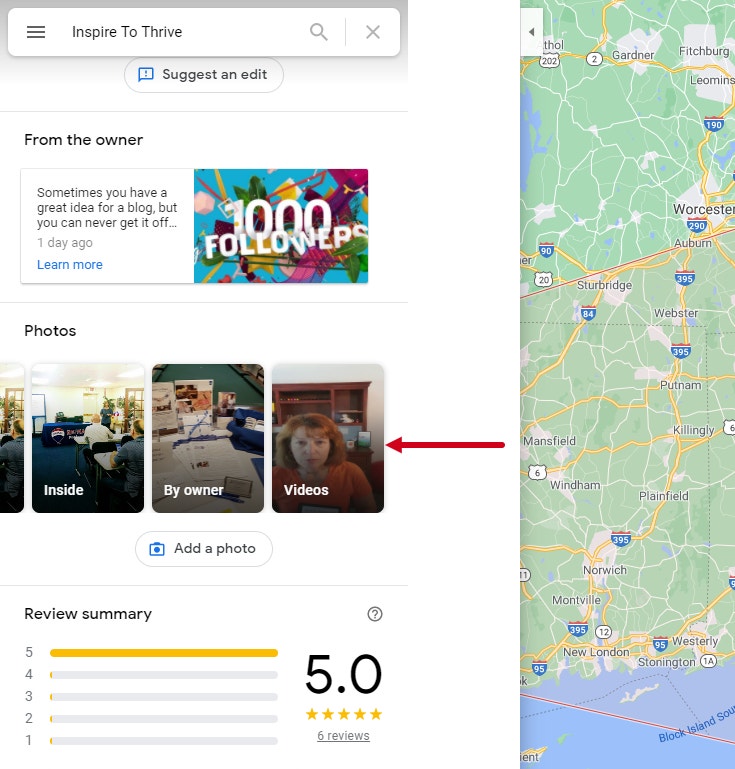
The videos you add will be visible in your listing’s Photos section, as you can see here in digital marketing firm Inspire to Thrive’s profile:
7. Track how customers are using your listing with GMB Insights
The GBP Insights section lets you see how people are interacting with your listing. You can use this data to provide more responsive customer service, identify important search terms, and flesh out parts of your profile that people are most interested in—all of which can contribute to happier customers and an improved reputation.
Are online reputation issues hurting your business? Find out with our free Reputation Report Card.
You can view the following stats in a weekly, monthly, or quarterly format. (To view up to 18 months of information, you can select “Download Insights” from the dashboard and follow the prompts.)
- Where people see you on Google—There are two choices: Google Maps or Google Search.
- How customers are searching for you—There are two methods customers use to look for you online: direct (where they search for your name or business address) or discovery (where they search for what you do or what you sell, like “plumber near me”).
- The actions individuals are taking—Are they visiting your website, calling you, asking for directions, or chatting with you?
- Which words people are using to search for, and find, your business—While this information is similar to what Google Search Console offers, these results are specific to your GBP profile.
- When people call you on the phone—You can break this data out by the time of the day or the day of the week.
- Number of photo views—This data lets you know how many consumers have viewed each photograph in your GBP listing.
- Photo quantity—Here, you can see how many pictures you have in comparison to similar businesses.
For more details on what each data point means, see this article from BrightLocal.
8. Clean up duplicate listings
If you change your name or location, or you didn’t check to see if your business already had a listing before creating a new one, multiple Google Business Profile listings for your company name might exist.
See your business's reputation the way your customers do. Get your free Reputation Report Card.
Duplicate listings make your business look less credible. They also confuse consumers by making it hard for them to tell which listing has the correct information. Moreover, because your reviews are a search engine ranking factor, duplicate listings can also negatively affect your position in the search results if people mistakenly leave reviews on the incorrect listing.
To learn how to remove duplicate listings, see Google’s step-by-step guide.
9. Connect with customers via GBP Messages
A smart way to prevent unnecessary customer frustration (and reduce the chance of negative reviews) is to make it easier for people to get in touch with you. One method of doing so is adding messaging to your GBP profile.
This way, consumers can message you right from the search results page and receive a timely response. Moreover, the vast majority of people (90%) prefer text messages over phone calls.
To enable GBP messages on your profile, download the GBP app on your Apple or Android device and set your listing to allow messaging.
10. Take control of your Questions & Answers
If you have a GBP account, then people searching for your business might see a Google local knowledge panel in the search results. This box contains handy information people might want to know about your business and includes a Questions & Answers section that appears right above the Reviews section.
Here’s an example of the local knowledge panel and the Questions & Answers section for marketing firm MobileMoxie:
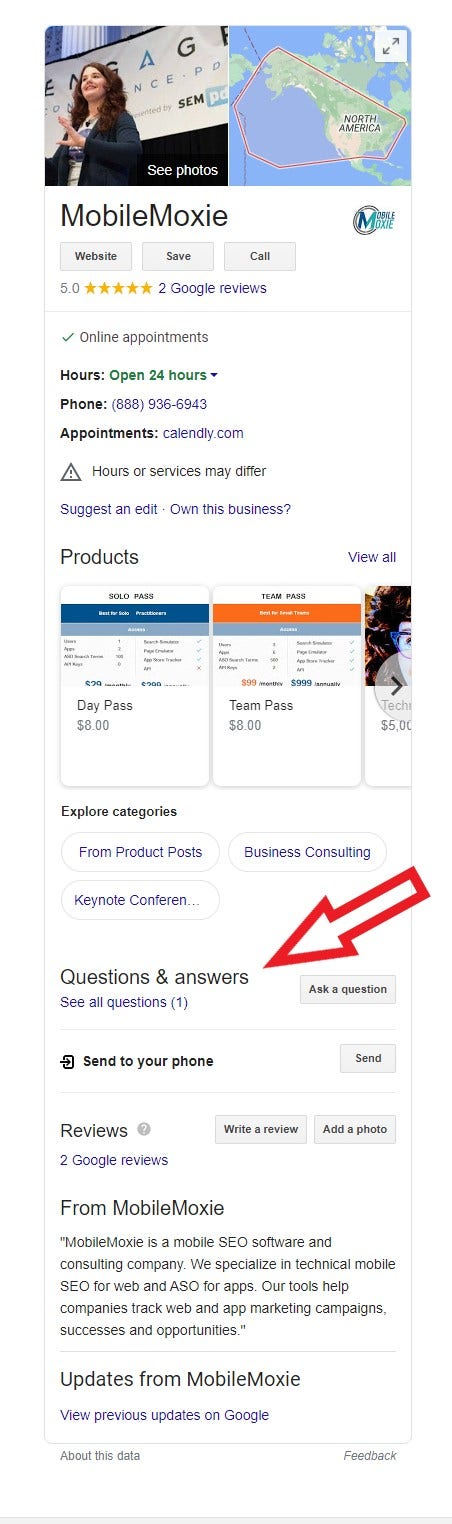
You can use this Q&A section to proactively ask and answer questions and proactively inform consumers of vital information, like accessibility, special Covid precautions you are taking, and more. However, because anybody can ask and answer questions here, you’ll need to monitor your knowledge panel very carefully to ensure that it continues to present your business in the best possible light.
Are online reputation issues hurting your business? Find out with our free Reputation Report Card.
It’s also a good idea to do the following:
- Flag inappropriate comments or questions—There’s always a risk of spam or otherwise inappropriate material when you are dealing with user-generated content. Make sure you flag these items for removal as soon as you spot them.
- Answer (or re-answer) every question*—* It’s important to ensure people know your take on a question, even those that someone else has already answered. When you do so, remember to answer from your GBP account and thank the previous responder for his or her input.
11. Update your business listing often
Google believes that business websites that regularly update their content with fresh material are more likely to be more reputable, which, according to Google’s expertise, authoritativeness, and trustworthiness (EAT) guidelines, means these businesses have a better chance of ranking well in search results.
This same logic applies to your GBP listing. Therefore, it’s important to continually add new posts to your profile in order to increase your rankings in the search results.
For tips on creating effective GBP posts, see this Google support article.
Next steps
Now that you know how to leverage your Google Business Profile to improve your online reputation, you might be interested in what other steps you can take to positively influence people’s opinion of your brand.
If you’d like some advice regarding your unique reputation needs, feel free to give us a call. We offer several reputation solutions for small and medium-sized businesses, including a local review management product, that can help you streamline the tasks involved in building and maintaining your business’s online presence.
Need assistance? Talk to an expert.
All ReputationDefender consultations are free, confidential, and without obligation.
Call 877-492-5209 or Schedule a Consultation