How to delete yourself from the internet (2025 guide)

- 4 privacy tips>>4 essential online privacy tips everyone should follow
- More drastic measures>>More drastic privacy protection measures
- Online privacy matters>>Online privacy matters
This post has been modified to reflect new information since its original publication.
Online privacy is a hot topic these days, especially with giant data breaches exposing millions of individuals’ personal information. The natural response is to want to protect yourself by deleting everything about you from the internet. But, is this even possible?
The short answer is no—but that doesn’t mean there’s nothing you can do. There are steps you can take that will significantly reduce the amount of personal data about you on the internet, providing you with important protection against identity theft, privacy violations, online stalkers, and other threats.
In this article, we’ll show you some essential online privacy precautions that everyone should follow, no matter who they are or what issues they face. We’ll also provide you with information on some of the more drastic removal steps you may want to consider.
4 essential online privacy tips everyone should follow
1. Be careful what you post online
It may sound obvious, but one of the keys to keeping your information private is not to post it in the first place. Today, however, many services automatically transmit your personal information by default. You need to stay vigilant about what you’re posting, even when you don’t realize you are doing so:
- Minimize disclosures: Don’t give out any information unless you have to. When you’re creating a profile or signing up for a service, only provide what’s absolutely required.
- Review privacy settings: Do what you can to limit who can see your information on public forums such as social media sites. (For help configuring your Facebook settings, see Facebook’s Basic Privacy Settings & Tools page.)
- Be an imposter: Whenever you need to create an online username or profile, use an alias and an anonymous or throwaway email address. This prevents your online activity from being tied to your real name.
Has your personal information been exposed online?
- Be aware of what your online actions are telling others: Every time you “like” something or “upvote” an article, you are adding to the databases of companies that created those buttons. You are also giving away your physical location when you “check in” somewhere.
- Turn off geolocation tracking: Your smartphone might be sending information about your physical location on an ongoing basis to any number of online services. Update your phone settings to turn off geolocation tracking.
- Review your app permissions: Many people automatically click “accept” whenever a smartphone app asks for permission to view your data. But many of these apps will work just fine without access to your address book, location, and other personal information. Review each privacy request carefully and reject as many as possible.
2. Find out who is posting your information online
Even if you post nothing yourself, other people may be posting information about you for their own purposes. As such, your next step should be to locate as many of these third-party posters as possible and ask them to stop sharing your information.
Google yourself and see what kind of search results appear. If you have a generic name, it’s a good idea to search for different versions of your name, such as name + employer, name + city, and any other combinations that might bring up results about you.
Make sure you examine the first three results pages, as well as the image and video tabs, because they might contain personally identifying information too. Then, make a list of where your information is located.
The most common search results containing personal information include:
Ready to protect your identity & secure your private information?
- People-search sites: There are hundreds of these types of sites on the web. They make their money selling your address, phone number, birth date, and other vital information.
- Social media platforms: Sites like LinkedIn, Facebook, and Twitter are often at the top of the search results for someone’s name. Once someone clicks your profile, that person gains access to information like the places you’ve lived, where you’ve worked, and the names and profiles of all your friends.
Of course, there are many other places your information might appear. Make sure to include every website that mentions you in your list, even if you’ve never heard of it before. If it’s in your search results, it’s worth addressing.
3. Opt out of people-search sites
If your Google search reveals that data-broker sites (also called people-search or whitepages sites) are posting your information, then you will need to ask them to remove it.
These websites constantly scan the web, looking for information about you that they can collect and sell.
Some of the biggest people-search sites include Spokeo, US Search, Intelius, MyLife, Radaris, Whitepages, and PeopleSmart.
For specific instructions on how to get these companies to do so, see our in-depth article How to remove yourself from the top people-search sites.
You should also check your state’s privacy laws to see if you have any legal means to stop someone from selling your data. The California Consumer Privacy Act (CCPA), for example, gives California residents the right to:
Has your personal information been exposed online?
- Know what kind of personal information someone has collected about you
- Know whether (and with whom) your personal information is sold or shared
- Opt out of having your personal information sold
Residents of Virginia can rely on the Virginia Consumer Data Protection Act (CDPA) to safeguard their personal information. The CDPA, which went into effect January 1, 2023, gives consumers many of the same protections as the CCPA. However, there are some key differences between the two.
4. Ask Google for help
Google will not usually help you remove online information, but there are a few specific exceptions to this rule. If any of these apply to you, follow the instructions below:
- Outdated content that remains in the Google cache: To delete these items, go to the Remove outdated content page, paste in the URL of the page that contains the outdated content, and choose “Request removal.” Depending on the specifics of your situation, you may need to enter more information or go back and forth a couple of times with Google.
- Copyright violations that fall under the Digital Millennium Copyright Act: If someone is posting information that you have copyrighted, you can ask Google to remove it via its legal removals page.
- Legal orders from a court of law: Use the legal removals page to delete search results that a court has ordered taken down.
- Personal information that poses certain risks: you can use the Remove your personal information from Google page to remove search results containing information (such as your Social Security Number, bank account or credit card number, or medical records) that poses a significant risk of financial fraud, identity theft, or other certain dangers. This is also the page to use to remove nonconsensual explicit images.
More drastic privacy protection measures
While the above is sufficient for the privacy needs of most people, there are additional steps you can take, although they involve making certain trade-offs. These steps are not for everyone, and you’ll need to weigh the pros and cons. Consider:
- Many of the actions we suggest below cannot be undone. This means you could lose valuable information and any status you’ve earned from your online presence.
Ready to protect your identity & secure your private information?
- There’s nothing stopping someone else from putting information about you online without your consent. This is why privacy protection coupled with a proactive online reputation management plan is usually the better option.
- The lack of a digital footprint can hurt you professionally and even hinder your ability to get a job.
- If you change your mind about closing an account, you might not be allowed to restart it with your previous name or email address.
You should also ask yourself why you’re doing this. Are you being harassed, or are you in danger? Or, are you just trying to reduce the impact of technology on your life? Make sure you understand what issues you are trying to address so that you can tailor your approach to resolving them. There may be a better way to tackle your problems. If you need assistance figuring out the best course of action, you can always call ReputationDefender for advice, free of charge.
Delete your social media accounts
Social media platforms like Twitter, LinkedIn, Facebook, and Instagram, contain lots of personal information about you, and thus, expose you to many risks. If you’re certain that you won’t need these accounts for anything in the future, then you can go ahead and delete your accounts.
Here are some site-specific instructions:
Has your personal information been exposed online?
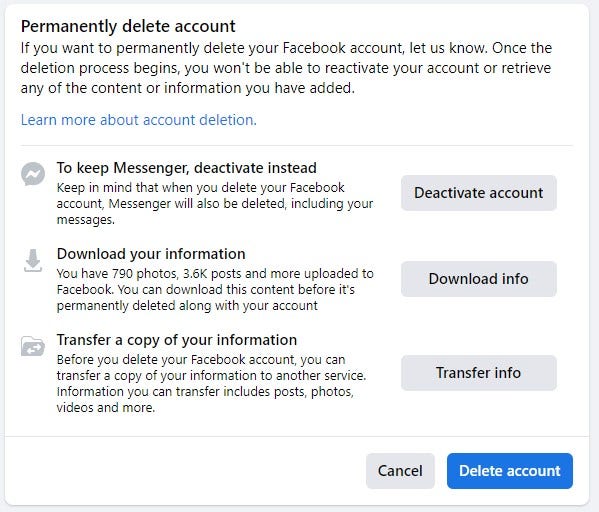
- Go to Facebook’s Permanently Delete Account page.
- Click “Download info” to save a copy of all your information (like your posts and photos). After you delete your account, these items will be inaccessible.
- Click “Delete Account.”
It may take up to 90 days to remove all your information. However, during this time, your information will not be visible to other users.
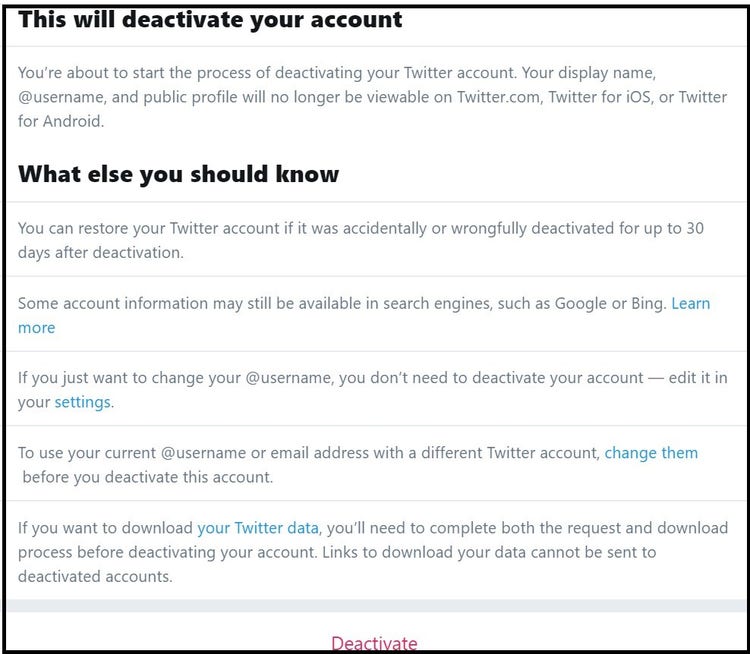
- Go to your Twitter account settings page.
- Select “Deactivate Your Account” at the bottom of the page.
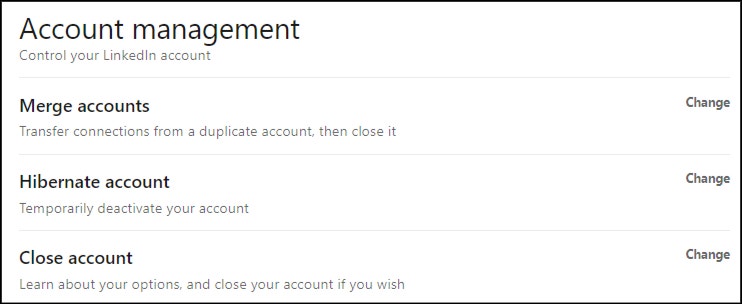
- Log in and click on “Me” in the upper-right corner.
- Select “Settings & Privacy” under Account in the drop-down menu.
- Choose “Account Preferences” from the left-side menu and then click “Account management”
- Choose “Close account” and fill out the required fields.
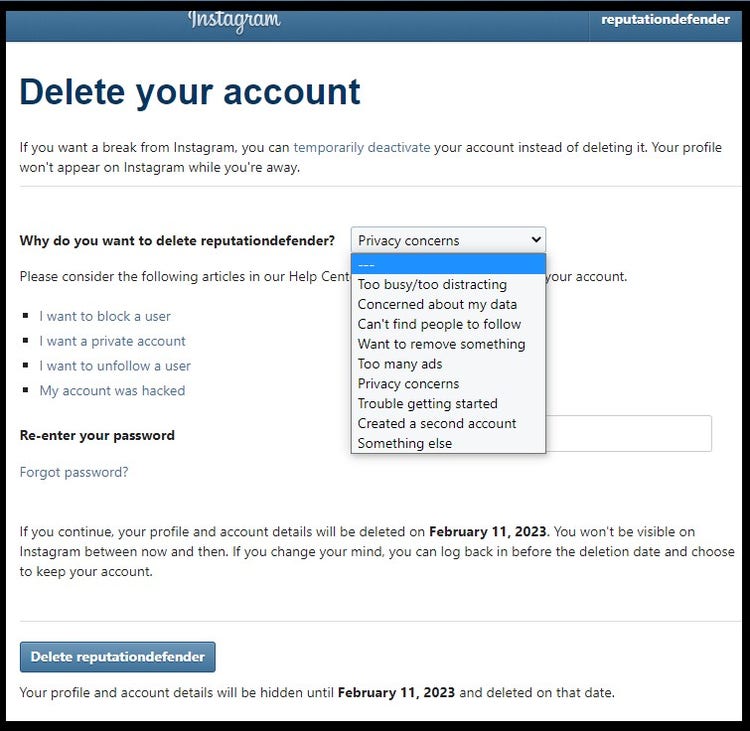
- Log in and go to the Delete Your Account page.
- From the drop-down menu, select the reason you are deleting your account.
- Re-enter your password, if asked.
- Click “Delete account name.”
Close your shopping and web service accounts
Shopping sites and other websites you do business with track your online actions and may store your financial data. To reduce the odds of this information falling into the wrong hands, you can close any accounts you have with these sites, especially if you no longer use their services.
The first step is to sit down and make a list of which sites you have signed up for. Popular accounts include:
- Amazon
- eBay
- Netflix
- PayPal
- Zappos
- Etsy
- Overstock.com
- Shutterfly
- Flickr
- DropBox
Note: Make sure you download any digital files you store on these sites before closing accounts. Otherwise, you may lose them permanently.
Here’s how to close your account on the biggest site, Amazon:
Ready to protect your identity & secure your private information?
- Log in and make sure you don’t have any outstanding orders.
- Go to Amazon’s Close Your Account page, scroll to the bottom and select a reason from the drop-down list.
- Click the checkbox next to “Yes, I want to permanently close my Amazon Account and delete my data.”
- Click the “Close My Account” button.
Delete your email accounts
The most drastic step you can take to remove yourself from the internet is to delete all your email accounts. However, you’ll need to use an email address to complete the steps described earlier in this section, so be sure you have deleted all your other accounts before you do this.
Depending on which email provider you use, the steps you’ll need to take will vary. Basically, you’ll do the following:
- Log in to your account.
- Back up your emails somewhere, so that you still have access to them.
- Find the option to close or delete your account.
Delete your Google account
Google gathers an enormous amount of personal information about you through its various products and services. For example, it knows what you watch via your YouTube account. It also knows who you meet with and when if you use Google Calendar. If you use Google Photos or Google Home, it even knows what you look and sound like.
You can find instructions for deleting your Google account on the company’s Delete your Google Account page. To delete specific products, go to the Remove products page.
Online privacy matters
Remember, there is a reason that even those of us with nothing to hide put locks on our doors and curtains on our windows. Privacy is an essential component of our human dignity and personal safety. Just because what we care about protecting is online, doesn’t make it any less OURS.
For more information about protecting your online privacy, check out some of our other popular privacy articles, including:
- How to remove public records from the internet in five steps
- How to remove WHOIS database information and protect your online privacy
- How to remove yourself from the top people-search sites
- Top 10 reasons to keep your personal information private
Need assistance? Talk to an expert.
All ReputationDefender consultations are free, confidential, and without obligation.
Call 877-492-5209 or Schedule a Consultation